When you start an online store, the first big decision is the platform. There are plenty of options, and every vendor promises that theirs is easy, affordable and scalable. The real differences only show once you use it: in the monthly costs, the number of add-ons and who fixes the store when something stops working.
In this article, we compare the most common online store platforms, give an honest view of their strengths and weaknesses and go through what an online store really costs per month.
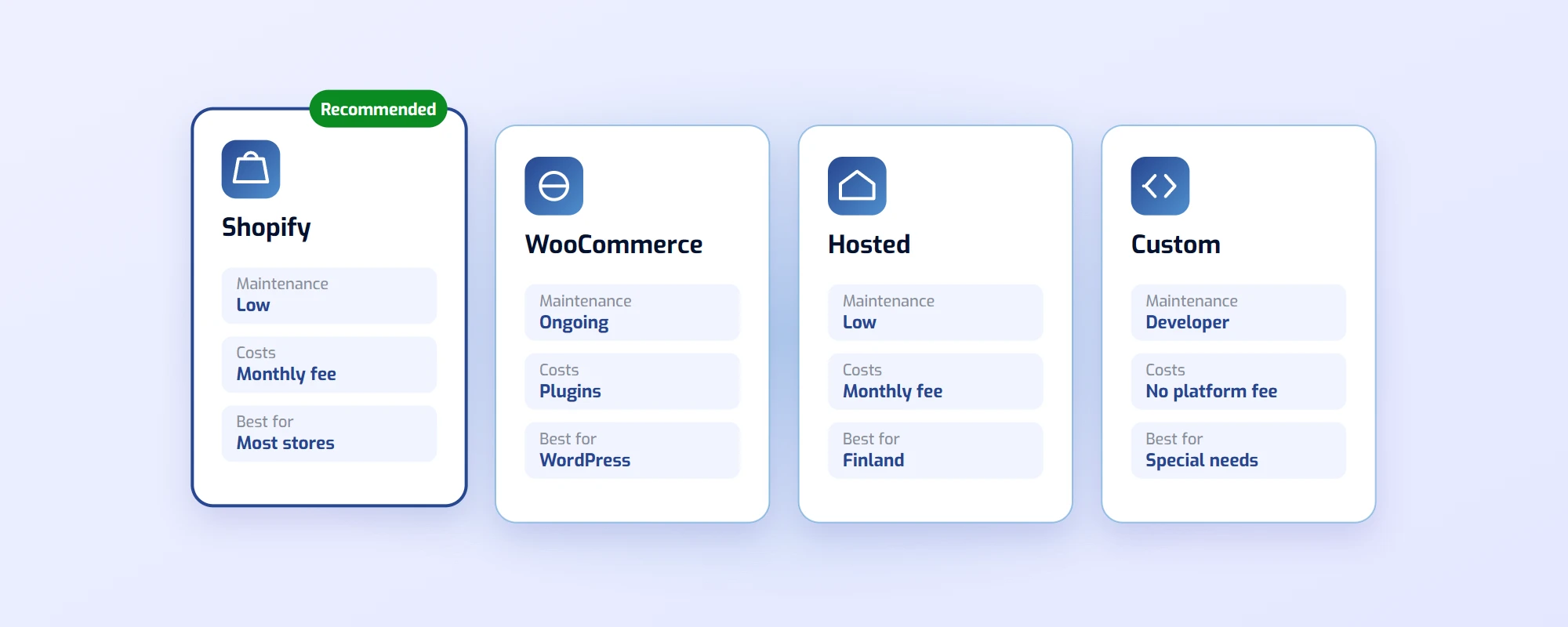
In short: For most new online stores we recommend Shopify: it is easy to use, needs little maintenance and has ready-made integrations with payment and shipping services. WooCommerce suits a business that already has a WordPress site and someone skilled to maintain it. A custom store makes sense when your needs are so specific that a ready-made platform can’t handle them.
Online store platforms compared
| Platform | Best for | Maintenance |
|---|---|---|
| Shopify | Most new stores | Low |
| WooCommerce | Alongside a WordPress site | Ongoing |
| Hosted platform | Selling in Finland | Low |
| Custom | Special needs | Through the developer |
The monthly costs are broken down further down.
Quick picks:
- You are starting your first online store → Shopify
- You already have a WordPress site and a skilled maintainer → WooCommerce
- You only sell in Finland and want support in Finnish → a Finnish hosted platform
- You sell abroad → Shopify
- The store needs bookings, a product configurator or something else unusual → custom
Why the choice of platform matters
You can switch platforms later, but it is always a big project. Products, customers and order history have to be moved, the design rebuilt and every old address redirected to the new one, so your search visibility isn’t lost.
Imagine this: a small store starts on the cheapest platform it can find. Two years later it has ten times as many orders, but the platform can’t connect to a proper warehouse system or a new carrier. Moving to a new platform costs more than the right choice would have cost in the first place.
The platforms in detail
Shopify
Best for: most new online stores, including those selling abroad.
Shopify is one of the most popular online store platforms in the world. It is easy to use, and hosting, security and updates are part of the service, so you don’t have to worry about them. The store can be fully in Finnish or any other language, and it has ready-made integrations with common payment and shipping services, including Finnish ones such as Posti and Paytrail.
Price: a monthly fee to Shopify (Shopify pricing) and the monthly fees of any paid apps. If you use a payment service other than Shopify Payments, Shopify also charges its own transaction fee.
Keep in mind: Features are added with apps, and each one often has its own monthly fee. Choose apps carefully.
WooCommerce
Best for: businesses that already have a WordPress site and a maintainer who handles the updates.
WooCommerce is a free WordPress plugin that turns a site into an online store. It is very flexible, and there is a ready-made plugin for almost everything. The store runs on your own server, so you have full control over it.
Price: hosting, paid plugins (often with an annual fee) and maintenance.
Keep in mind: For most stores WordPress is unnecessarily heavy. Plugins and updates need constant maintenance, and every plugin is a new security risk. That is why we don’t recommend WooCommerce for new stores, but we maintain existing ones and help move them to Shopify if needed.
Finnish hosted platforms
Best for: stores selling in Finland that want service and support in Finnish.
Finland has its own hosted online store platforms, such as MyCashflow and Vilkas. They work on the same principle as Shopify: you pay a monthly fee, and the provider handles the servers and updates. Finnish payment and shipping services are usually built in.
Price: a monthly fee depending on the plan.
Keep in mind: The selection of ready-made themes, apps and experts is smaller than with Shopify. If you plan to sell abroad, check the international features in advance.
Custom online store
Best for: stores whose needs don’t fit a ready-made platform.
A custom store is coded for exactly your needs. It can combine the store with, for example, bookings, a product configurator or your company’s own systems. A well-built custom store is also the fastest option, and there is no monthly platform fee.
Price: a higher build cost, no monthly platform fee.
Keep in mind: New features are always made by the developer, so choose a partner who maintains the store after launch too. For ordinary product sales, Shopify is usually the more sensible choice.
What does an online store cost per month?
The platform’s monthly fee is only part of the costs. Include at least these:
- Platform: the Shopify or hosted platform fee, or hosting for WooCommerce.
- Apps and plugins: for example product reviews, a newsletter and an accounting integration.
- Payment service: every payment carries a commission. Read more in choosing a payment service for your online store.
- Shipping: a carrier agreement and packaging.
- Domain: your own address, for example yourstore.com. Register a domain if you don’t have one yet.
- Maintenance: your own time or a partner who handles updates and changes.
You can see the prices of our online store package in our pricing. Shopify’s own monthly fee is paid directly to Shopify.
How to switch online store platforms
If your store already exists, a move goes smoothly when you do it in order:
- Move the products with their images, variants and stock levels.
- Move customers and order history, so returns and customer service keep working.
- Redirect the old addresses to the new ones with 301 redirects. Without them, your search visibility is lost.
- Place a test order with every payment and shipping method before launch.
- Launch at a quiet time and follow orders closely for the first few days.
The most common mistakes in choosing a platform
- Choosing the cheapest platform: The monthly fee is small, but missing integrations cost time every day.
- Installing too many apps: Each one slows the store down and adds to the monthly costs.
- Forgetting local payment methods: Without the methods your customers are used to, some of them abandon their purchase.
- Leaving the store without maintenance: After launch, a store needs updates, new products and order handling.
Online store platform FAQ
Is Shopify good for a small business?
Yes. With Shopify you don’t have to worry about servers or updates, and you can start with a small plan and grow later. For most small stores it is the easiest way to start selling.
Does Shopify work with Finnish payment methods?
Yes. In Finland, Shopify Payments covers cards and mobile wallets, but not Finnish online banking or MobilePay. You get those with a Finnish payment service, such as Paytrail, which can be connected to Shopify.
Can a WooCommerce store be moved to Shopify?
Yes. Products, customers and order history can be moved, and the old addresses are redirected to the new ones. Plan the move so the store isn’t closed at all.
Which is cheaper, Shopify or WooCommerce?
WooCommerce is free as a plugin, but hosting, paid plugins and maintenance cost money. Once the maintenance time is counted, Shopify is often cheaper for a small store.
Do I need programming skills for an online store?
Not with Shopify or a hosted platform. Adding products and handling orders is done in the browser. With WooCommerce and a custom store, you need a developer for updates and changes.
Summary
Choose your online store platform based on what you sell, where you sell it and who maintains the store. For most new stores, Shopify is the easiest and safest choice; WooCommerce suits an existing WordPress site, and a custom store suits special needs.
We build online stores and also run their day-to-day: orders, shipping and product updates. Read more about online store management or request a quote.